
Campaign Header
Adds the Campaign Header with customisable title and logo to PPC Campaign pages. Add content to child section 'header', which in inherited by all pages in the given branch.
Content Type Details
- ID: 443
- Name: Dallas - Campaign Header
- Minimum user level: Contributor
- Use with page layouts: PPC Campaign - in Main Body
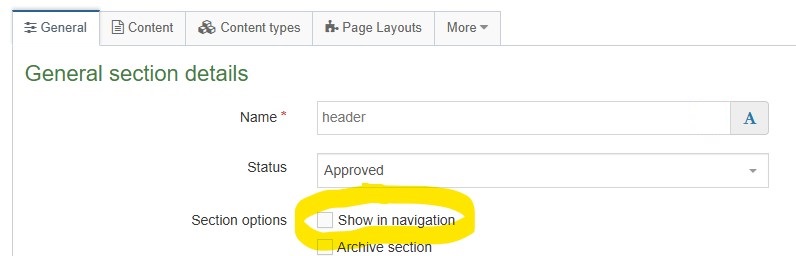
Please ensure that the section name is exactly 'header' in all lowercase. Additionally, make sure the 'Show in Navigation' option for the 'header' section is unchecked:
Content Type Elements Details
| Name | Description | Size | Type | Required | Conditionally Shown |
|---|---|---|---|---|---|
| Name | The Name Element | 80 Characters | Plain Text | Yes | No |
| Campaign Title | Enter text for the heading. This is the H1 on the page in the top blue bar. | 255 Characters | Plain Text | Yes | No |
| Hide Title | Check to hide the header visually from the top of the page. Choose from options: Yes | N/A | Check Box (List: Dallas - Yes - unchecked) | No | No |
| Campaign Logo | Select a suitable image from the Media Library, defaults to Dallas College logo if not populated | N/A | Media | No | No |
| Campaign Logo Link | By default the logo links to main site homepage, override this by choosing a section | N/A | Section/Content Link | No | No |
| Header Style | Select the style for the campaign header. Default is solid blue. Choose from options: Blue, White, Image, Default | N/A | Select Box (List: Dallas - Campaign Header Style) | No | No |
| Background Image | Select an image to display in the header background. Recommended 1800x200. | N/A | Media | Yes | Yes |
| CTA Button Text | Enter the text for an optional CTA button in the header | 50 Characters | Plain Text | No | No |
| CTA Link | Select an internal section to link the CTA button to | N/A | Section/Content Link | Yes | Yes |
| CTA Button Color | Select the color for the CTA button Choose from options such as: Blue, Red, Grey, Light Blue, Light Red | N/A | Select Box (List: Dallas - Button Colors) | Yes | Yes |
Example
See screenshot of an example Campaign Header. The heading, logo and logo link are set using elements on the content type, the links under Explore and Locations remain the same and are set in Campaign Header content type text/header layout:
