
PHP Search View
Used to add views to display content for the PHP Search Module (Area of Study, News, Employee)
Content Type Details
- ID: 518
- Name: Dallas - PHP Search View
- Minimum user level: Administrator
- Use with page layouts: Module Page - in Main Body, Module Page - in Sidebar
View files are in the Media Library:
- Categorised > Dallas College > Site Assets > Modules > PHP Search > Area of Study
AreaOfStudySearch-Main.phpmedia id: 12631 - displays search results and keyword search boxAreaOfStudySearch-Sidebar.phpmedia id: 12632 - displays sidebar with facets
- Categorised > Dallas College > Site Assets > Modules > PHP Search > Employee
EmployeeSearch-Main.phpmedia id: 12596 - displays search results and keyword search boxEmployeeSearch-Sidebar.phpmedia id: 12601 - displays sidebar with facets
- Categorised > Dallas College > Site Assets > Modules > PHP Search > News
NewsSearch-Main.phpmedia id: 12552 - displays search results and keyword search boxNewsSearch-Sidebar.phpmedia id: 12554 - displays sidebar with facets
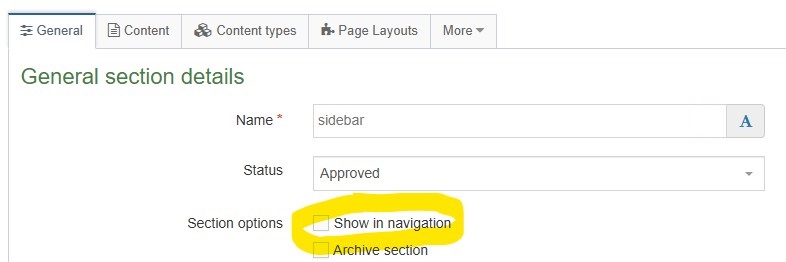
For adding the sidebar view content to child section 'sidebar', ensure that the section name is exactly 'sidebar' in all lowercase. Additionally, make sure the 'Show in Navigation' option for the 'sidebar' section is unchecked:
Content Type Elements Details
| Name | Description | Size | Type | Required | Conditionally Shown |
|---|---|---|---|---|---|
| Name | The Name element | 80 Characters | Plain Text | Yes | No |
| PHP Search Config Link | Select the section where the PHP Search Configuration is located | N/A | Section/Content Link | Yes | No |
| View | Select View file from the Media Library | N/A | Media | Yes | No |
| Position in the Page | Select position in the page to display the view Choose from options: Default, Sidebar | N/A | Select Box (List: Dallas - PHP View Positions) | Yes | No |
Examples
- Area of Study Search
- Employee Directory
- News Search