
How Is Online Study Different?
Types of Classes
Most classes at Dallas College fall into three basic categories: on-campus (face-to-face), online and hybrid.
/prod01/dc1-cdn-pxl/media/dallas-college/content-assets/images/students/class2.jpg)
On-Campus (Face-to-Face) Classes
These are classes you attend in person. They take the form of lectures and labs and involve face-to-face interactions with your instructor and fellow students.
100% Online Classes
The entire class is delivered over the internet using a virtual classroom. All on-campus resources (like libraries and tutoring) are still available to you.
/prod01/dc1-cdn-pxl/media/dallas-college/content-assets/images/students/online.jpg)
/prod01/dc1-cdn-pxl/media/dallas-college/content-assets/images/students/hybrid.jpg)
Hybrid Classes
A portion of the class takes place on campus and the other part takes place online in a virtual classroom. For example, you might meet for 1.5 hours on campus and then spend 1.5 hours reviewing online resources and participating in online activities.
Note: There is no distinction between on-campus, online and hybrid classes on your college transcript.
How Do Traditional Classes Compare to Online Classes?
Traditional Classes May Be Called:
- In-person
- Face-to-face
- On-campus
What You Can Expect in Traditional Classes
- Go to class on specific days at specific times
- Bring your course materials and supplies to class with you
- Work through the chapters in a textbook
- Learn from your instructor by listening as they go over class materials, explain concepts and answer questions
- Complete some assignments in the classroom
- Visit with your instructor face-to-face during office hours for one-on-one assistance and questions
Online Classes May Be Called:
- 100% online
- Hybrid
- Blended
What You Can Expect in Online Classes
- Log in every day (including on weekends)
- Learn by reading and interacting with online instructional materials
- Take part in online activities with other students
- Follow a schedule of what you need to do each week
- Be responsible for creating a plan of how you will use your time throughout the week
- Complete all your assignments electronically — normally, that means producing a text document, but it could include using a cellphone to create videos or take photos
- Contact your instructor primarily by email or during virtual office hours for one-on-one assistance and questions

/prod01/dc1-cdn-pxl/media/dallas-college/content-assets/images/news/2025/premier-scholarships-450X300.jpg)
How Do Online Classes Work?
- Online classes require excellent time management skills, study skills and initiative.
While they provide much more freedom for your schedule, you must be proactive, self-motivated and responsible to be successful. Because of this, online classes are generally harder for dual credit high school students. We strongly recommend taking at least one on-campus class before attempting an online class. - An online class can be accessed through eCampus at any time once the class starts.
You will have access to a course syllabus, which will explain the class expectations and all assignments and tests that are required to pass the class. Each week, you will be required to complete readings, quizzes and other assignments as appropriate. Generally, online classes are not self-paced, and assignments and tests may only be available for a limited amount of time. - If you have questions about your class, email your instructor.
Allow at least 24 hours for a response. You are expected to contact your instructor in advance of important deadlines (tests, exams, last day to withdraw, etc.). Instructors may not remind you of missing assignments, and they reserve the right to not offer makeup exams and quizzes.
What Do Students Say About Online Learning?
/prod01/dc1-cdn-pxl/media/dallas-college/content-assets/images/dallas-college-online/getting-ready-for-online-learning/online-student1-150X150.png)
“I’ve taken face-to-face classes, and online classes don’t require less effort, time or work. You still have to make time each week to complete assignments and meet deadlines.”
/prod01/dc1-cdn-pxl/media/dallas-college/content-assets/images/dallas-college-online/getting-ready-for-online-learning/online-student2-150X150.png)
“I completed an eight-week online class. Each week, I had to spend at least 12 hours working on reading and assignments for the class.
Read the syllabus first, figure out a schedule and stick to it. Also ask your instructor for help when you need it!”
/prod01/dc1-cdn-pxl/media/dallas-college/content-assets/images/dallas-college-online/getting-ready-for-online-learning/online-student3-150X150.png)
“I enjoyed studying online and having a more flexible schedule, but it’s tough! When they say eight to 10 hours each week, it’s eight to 10 hours each week or more in some weeks.”
Be Prepared To Study Online
It’s important you think carefully about the decision to take an online class. Ideally, you should be able to answer “yes” to all the questions below.
- Do you have reliable access to a computer and the internet
- Can you use a web browser to search the internet?
- Do you have basic computer skills such as sending/receiving email or creating a document?
- Are you comfortable asking for help with technology if needed?
- Are you self-motivated and do you enjoy working independently?
- Can you manage time efficiently and complete tasks on time?
- Can you learn from reading information online and watching videos?
- Can you follow written instructions to complete a task?
- Are you able to capture your ideas in writing
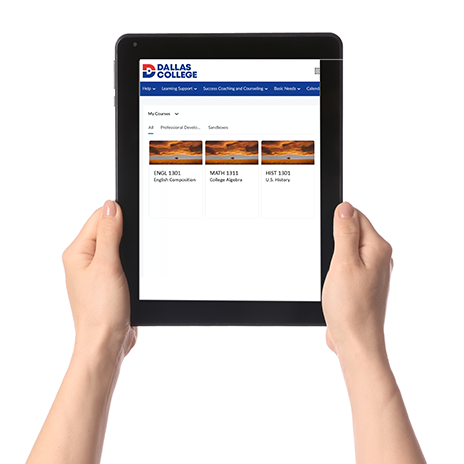
When you decide to take an online course, use the links below to help you prepare for your online learning experience.
Need Help? We’ve Got You Covered
Stuck on eCampus? Need technology help? Have questions about your student tools? Our support is just a click or call away.
eCampus and Tech Support
Phone
- 24/7: 972-669-6402
- 24/7: 972-992-3620
- Toll-Free, 24/7: 866-374-7169
- Dual Credit Students, 7 a.m.-Midnight: 972-669-6555
Ticket
Instructional Support
Get email support for a specific service: