
Create Readable Content
What do we mean by readable content?
When writing content online, readers need to be able to understand the content. Making the text easier to read does not mean lowering the complexity of thought. Creating readable content means taking into consideration decisions such as how to make the sentences clear and clarify unfamiliar terms.
Readable content plays a critical role in helping faculty, staff, students and community members understand and act on information without feeling overwhelmed. Keeping content clear, approachable and purposeful supports all readers, particularly multilingual readers, neurodiverse readers and other readers with cognitive disabilities. One benefit of readable content is that it reduces the cognitive load for all readers.
Readable content also includes design decisions. These design decisions include:
- Consistent headings and landmarks to indicate navigation
- Labels and descriptive words for links
- Chunked content into sections that show how ideas connect
- Examples of processes or assignments
When striving for readable content, follow these recommendations:
- Learning Content: Grades 10-12
- Public-Facing Web Content: Grade 8
- Safety-Critical Content: Grade 6
How do I know how readable my content is?
Microsoft and Google provide ways to review the readability of content.
In Word:
- Click on File
- Click on Options
- Open “Proofing” options
- Turn on “Show readability statistics”
- Click “OK” to save the changes
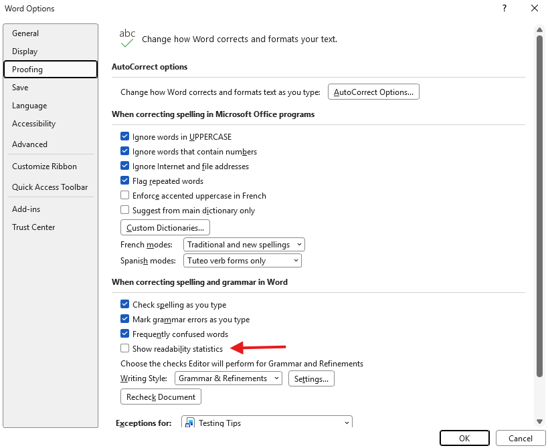
Once you have enabled the readability statistics, you can see the score by highlighting your text and following these steps:
- On the Home ribbon, click “Editor”
- Scroll down the vertical panel and click “Document Stats”
- A pop-up includes a readability grade level and other information