Skip to Main Content Open Alternative Formats of This Page
  • Students
    • Future Students
    • Current Students
    • International Students
    • High School Students & Parents

    • Alumni
  • Community & Business
    • Community

    • Business & Industry
    • Suppliers

    • Donate
  • Employees
    • Current Employees

    • Retirees
  • Español
  • Online Tools
    • Workday
    • eConnect (for CE students)
    • eCampus
    • My Dallas College
    • SharePoint
    • Email
    • Employee Directory
    • Navigate
    • Microsoft Teams

    • View more online tools...
  • Locations
    • Brookhaven - Farmers Branch
    • Cedar Valley - Lancaster
    • Eastfield - Mesquite
    • El Centro - Downtown Dallas
    • Mountain View - Oak Cliff
    • North Lake - Irving
    • Richland - North Dallas

    • View all locations...
Dallas College
About Contact Maps
  • Admissions
  • Paying for
    College
  • Classes &
    Degrees
  • Student
    Resources
  • Student
    Life
  • Request
    Info
  • Apply
    Now
  • I am a...
    • Future Student
    • Current Student
    • Former Student (Alumni)

    • Employee

    • Community Member
    • Business or Industry Partner
    • Supplier or Vendor
  • Online Tools
    • Workday
    • eConnect (for CE students)
    • eCampus
    • My Dallas College
    • SharePoint
    • Email
    • Employee Directory
    • Navigate
    • Microsoft Teams

    • View more online tools...
Dallas College
  • Admissions
  • Paying for College
  • Classes & Degrees
  • Student Resources
  • Student Life
  • Request Info
  • Apply Now
  • About
  • Contact
  • Maps
  • Español
  1. Home
  2. Resources
  3. Online Services and Tools
  4. Password Information
  5. Reset Your Password in eConnect

Reset Your Password in eConnect

You need to reset your password.

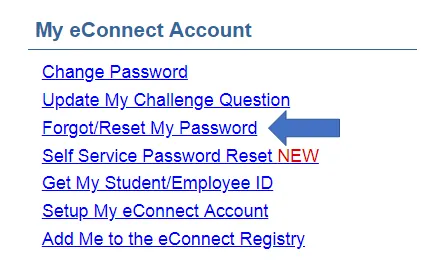
If you cannot remember your password for online services like eCampus and eConnect, you will need to reset it in eConnect before continuing on to the next step in this process.
Reset Your Password in eConnect

screen shot of econnect link with a red arrow pointing to the forgot or reset my password

After resetting your password continue to the next step.

Continue
  • «
  • 1
  • 2
  • 3
  • 4
  • 5
  • »
  • Password Information
  • Change My Password
  • eConnect Get My Sign-In ID User Guide
  • Navigating Your New Passwords: A Step-By-Step Guide
  • Step 1: Know Your Dallas College Username
  • Step 2: Your Dallas College Password
  • Reset Your Password in eConnect
  • Step 3: Enroll in the Self Service Password Reset Tool
  • Step 4: Create a new Dallas College Complex Password
  • You're All Set!
  • Multi-factor Authentication
  • Self Service Password Reset (SSPR) Enrollment Guide
  • Password Reset
  • Set Up Mobile Devices for Email After MFA
Updated September 5, 2025

Footer

DCCCD is now Dallas College!

  • Request info
  • Tour a Campus
  • Apply now

Popular Links

  • eConnect
  • eCampus
  • Workday
  • Libraries
  • Academic Calendar
  • Locations & Maps
  • Student Resource Directory

Resources

  • Arts Calendar
  • Athletics
  • Bookstores
  • Catalog
  • Class Schedules
  • Code of Student Conduct
  • Continuing Education
  • Financial Aid
  • Registration Dates
  • Student News
  • Transcripts

Help & Support

  • Contact Us
  • FAQs
  • Police & Emergency
  • Report Sexual Assault or Misconduct (Title IX)
  • Submit a Complaint
  • CARES Act Reporting
  • Public Information Requests

About Us

  • Events
  • Job Opportunities
  • News & Media
  • Schools

Student Help

  • Call Us
  • Text Us
  • Student Help
  • Phone: 972-669-6400
  • Text: 214-978-6457
  • Facebook
  • X/Twitter
  • Instagram
  • LinkedIn
  • YouTube
Apply
Maps
Contact
© 2026 Dallas College   1601 Botham Jean Blvd., Dallas, TX 75215   214-378-1500
  • Report an Accessibility Issue
  • Legal Notices
  • Financial Transparency
  • Privacy & Security Policy
  • Report Fraud
  • Site Map