
Find Your Dallas College Sign-In ID
Your student ID is a seven-digit number assigned to you after Dallas College receives your application. It also makes up your Online Services Sign-In ID.
Your student ID will be emailed to you from Dallas College Admissions after you apply. This tutorial will guide you on using eConnect to find your Dallas College student ID and Online Services Sign-In ID.
This guide is only for students who attended classes before Jan. 1, 2026, or who are taking continuing education (noncredit) classes.
If you started taking credit classes after Jan. 1, 2026, your student ID number can be found in the email from Dallas College Admissions that was sent to the address you provided on your application. If you can’t locate this email, please contact the Service Desk at 972-669-6402 to verify your identity and retrieve your ID number.
Find the eConnect Screen
- Start by going to eConnect.
- Select a relevant constituency menu (i.e. Student, Employee or Faculty).
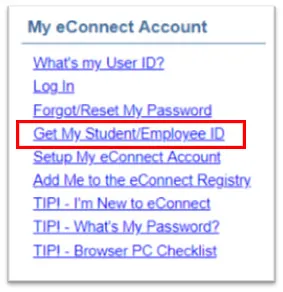
- In the My eConnect Account sub-menu, choose Get My Student/Employee/Retiree ID.
Enter All Required Information
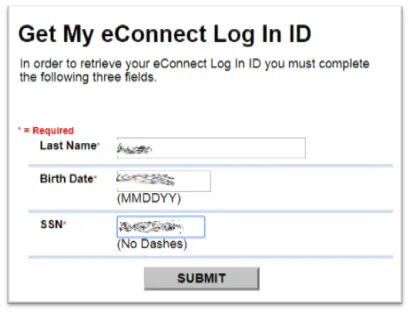
- Enter your Last Name on file with Dallas College.
- Enter your Birth Date in MMDDYY format.
- Enter your SSN (Social Security number) without dashes. *
*Some students do not have a Social Security number on file with Dallas College. Those students cannot obtain their Online Services Sign-In ID through this process. Those students should contact their preferred campus' Registrar’s Office instead.
Get the Results
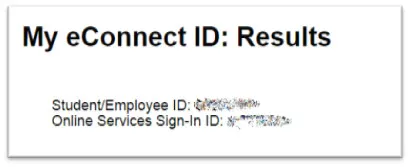
- Student/Employee/Retiree ID is a seven-digit number.
- Online Services Sign-In ID will be in e7 or 3x4 format. (i.e., e9876543 or cba4321)
If you have additional questions or issues, please contact the Service Desk.