
FERPA Release Form
What Is FERPA?
Dual credit students are also Dallas College students, which means their college education records are protected by federal privacy laws, even if they are still in high school or under the age of 18. The Family Educational Rights and Privacy Act (FERPA) is a federal law that protects the privacy of a student's college education records. Under FERPA, certain rights that parents typically have regarding their child’s school records transfer to the student when they enroll in a college course.
This means Dallas College generally cannot share information about a student’s grades, academic progress, class schedule or other education records with a parent, guardian or other individual without the student’s permission.
What Is a FERPA Release Form?
A FERPA release form allows a Dallas College student to give another person, such as a parent or guardian, limited access to certain information in their student record. The student must complete the form and identify who they are authorizing to receive information. However, a FERPA release does not provide full access to a student’s information or allow someone to act on their behalf. See below to understand what a FERPA release does and does not allow.
A FERPA release form allows an authorized person to:
- Access certain student information approved by the student such as class schedule and academic records.
- Receive information covered by the student’s authorization.
A FERPA release form does not allow a parent or guardian to:
- Contact instructors about grades, assignments, attendance or course progress.
- Make academic decisions for the student.
Have Questions?
If you have questions about a Dallas College course offering, instructor or the Dual Credit program, please contact EdPartnerships@DallasCollege.edu for assistance.
Ready To Complete the Form?
See our step-by-step instructions for the student to complete through their Workday student account.
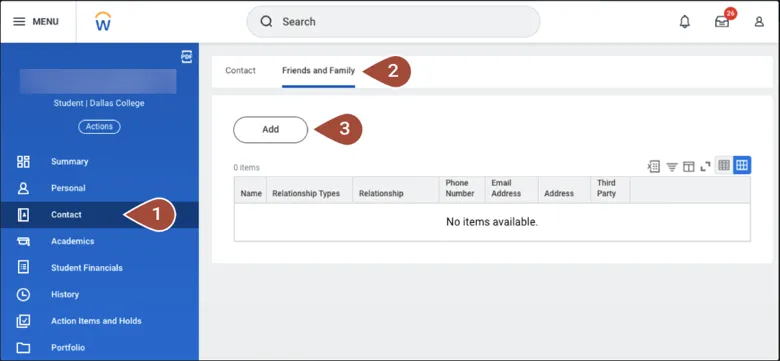
Step 1:
- From the student profile, navigate to the left-hand menu and select Contact.
- Select Friends and Family and then click Add.
Step 2:
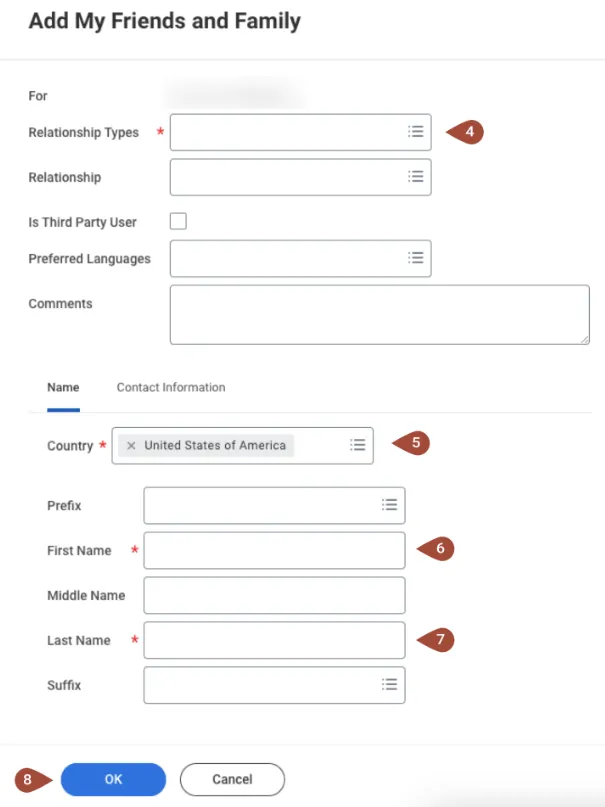
- Complete the required fields:
- Relationship Type
- Country
- First Name
- Last Name
- Select OK to save the information.
Important
To grant proxy access, be sure to check the box labeled “Is Third Party User.” Students may also return to this section at any time to update or remove proxy access.
Please note: Completing a FERPA release form does not allow parents or guardians to communicate directly with professors.